
틀:OrbmentEntry
다른 명령
| Line | Slot |  → →  Cost Cost |
|---|---|---|
| All — | |
|
| Display | ||
|
||
This template displays a combat orbment on character pages.
A combat orbment display consists of a table and a layout. This template renders the "table" part, and {{OrbmentEntry/layout}} renders the layout.
The "table" shows the configuration of the Orbment as it appears in the game menu, with line colors and slot locks. It also displays additional information like the sepith cost of opening or upgrading slots, and an initial configuration (when the character joins your party).
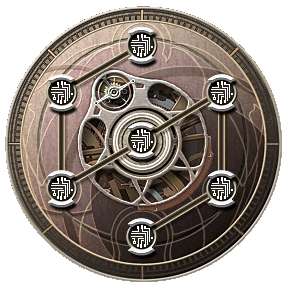
The "layout" shows a visual configuration of the Orbment, arranged in a game-specific manner. In many cases, this is a composition of many images from the games and arranged with HTML and CSS to show the lines, line colors, slot locks, and arrangement, as they appear in game.
Parameters
{{OrbmentEntry
|name=Chloe
|game=Akatsuki
|slot_count=7
|upgrade_count=2
|show_initial=yes
|show_upgrade_bonus=yes
|has_master=yes

|upgrade_1_type=Slot
|upgrade_1_from=Closed
|upgrade_1_to=Open

|upgrade_2_type=SlotUpgrade
|upgrade_2_from=1
|upgrade_2_to=2

|line_spoke_1=1
|line_arc_2=2
|line_arc_3=2
|line_spoke_4=2
|line_arc_5=1
|line_arc_6=1

...

|slot_1_pos=1
|slot_1_line=1
|slot_1_lock=Open
|slot_1_initial={{Slot|Open|Akatsuki}} {{SlotUpgrade|1|Akatsuki}} {{Quartz|Earth|Akatsuki}} Quartz #302001
|slot_1_upgrade_1={{SepithAmount|20|Akatsuki|Earth|Water|Fire|Wind|Time|Space|Mirage|digits=3}}
|slot_1_upgrade_1_bonus=+ 0 EP
|slot_1_upgrade_2={{SepithAmount|100|Akatsuki|Earth|Water|Fire|Wind|Time|Space|Mirage|digits=4}}
|slot_1_upgrade_2_bonus=+ 37 EP

...

}}
Header parameters
- name: The character's name.
- file_name: Optional. If different from name, the name to give to {{OrbmentEntry/layout}}. The "layout" only needs the correct name for the Sky series games.
- game: The "game" value to pass to all {{Slot}} and {{SlotUpgrade}} calls (one of "Sora", "Crossbell", "Sen", or "Akatsuki"; see {{g}})
- file_game: Optional. If different from game, the game to give to {{OrbmentEntry/layout}} to decide the layout to use. One of "Sora FC", "Sora", "Zero", "Ao", "Sen I II", "Sen III IV", or "Akatsuki"; see {{g}}. Only "Sora FC", "Sora", "Zero", "Ao", "Sen I II", and "Akatsuki" are currently supported.
- slot_count: Number of slot rows to show in the table. Includes Master Quartz row if present, but not Sub Master Quartz. 9 is the maximum number of slots. Slots are numbered from 0 (central or Master Quartz slot) to this number minus one.
- upgrade_count: Number of upgrade columns to show in the table. These each show an upgrade path (closed -> open, 1/2 -> 2/2, 2/3 -> 3/3) and how much of a resource "Cost" it is to do that upgrade to that slot, often in Sepith. Only 0, 1, or 2 upgrade columns are supported.
- upgrade_game: Optional. Passes to {{SlotUpgrade}} to use upgrade icons from a specific game, for example to tell the difference between "Zero" and "Ao" upgrade icons when using "Crossbell" for game value. Defaults to game if not present.
- show_initial: Optional. If "yes", show the "Initial" column, meant for the initial setup of the orbment.
- show_upgrade_bonus: Optional. If "yes", all upgrade columns come with an additional "Bonus" column showing how much of a bonus you get for opening or upgrading a slot, often in EP.
- has_master: Optional. If "yes", shows a Master Quartz slot in the first row instead of a central slot. Defaults to "yes" for some game values.
- has_submaster: Optional. If "yes", shows a Sub Master Quartz slot below the first row. Does not count as a slot for slot_count.
- ccw: Optional. If "yes", the orbment's arc lines flow counterclockwise in some layouts.
Upgrade path parameters
For each upgrade (between 1 and the number in upgrade_count), specify how to describe the update in the table header.
- upgrade_#_type: The template to pass both sides of this "upgrade path" to. Often either "Slot" (for opening slots) or "SlotUpgrade" (for upgrading opened slots).
- upgrade_#_from: The state of the slot before the upgrade. For type "Slot", usually "Closed". For type "SlotUpgrade" the slot level number before the upgrade.
- upgrade_#_to: The state of the slot after the upgrade. For type "Slot", usually "Open". For type "SlotUpgrade" the slot level number after the upgrade.
Line layout parameters
Every orbment has an arrangement of lines. This set of parameters allows you to "turn on" lines in the orbment display in order to build the display out of "spokes" and "arcs".
A "spoke" is defined as a line that connects a central or Master Quartz slot to a slot on the outside. It is always straight.
An "arc" is defined as a line that connects two slots on the outside. It is sometimes visually curved, depending on the game.
To build an orbment layout, you must know how each game's orbment slots are arranged visually, and the numbers assigned to each slot position in the layout and slot menu item in the table. See the table at the end of this page for that, but once you know where the "first" position is and the "direction", it's possible to draw out where the lines are using these parameters.
There are N * 2 line layout parameters (where N is the maximum number of supported slots by this template-- the underlying layout template will ignore parameters for lines outside that layout's definition), two for each possible position a layout can contain, a spoke and an arc.
So, they are:
- line_spoke_1
- line_spoke_2
- line_spoke_3
- line_spoke_4
- line_spoke_5
- line_spoke_6
- line_spoke_7
- line_spoke_8
- line_arc_1
- line_arc_2
- line_arc_3
- line_arc_4
- line_arc_5
- line_arc_6
- line_arc_7
- line_arc_8
This is designed so that spoke 1 connects slot 0 to slot 1, spoke 2 connects slot 0 to slot 2, spoke 3 connects slot 0 to slot 3, etc. Similarly, arc 1 connects slot 1 to slot 2, arc 2 connects slot 2 to slot 3, arc 3 connects slot 3 to slot 4, etc. The final arc is determined by the layout, and if the orbment is circular, will connect the last slot back to slot 1.
The values of these paramters are one of the numbers, 1, 2, 3, or 4. Those specify the color to display connecting the two slots. Anything else and the line connection is "off".
Slot parameters
For each slot (0 is the central slot and 1 counting up is the outside slots), specify several parameters. The slots here are arranged like they are seen in the menu portion (where the Quartz names are listed).
- slot_#_pos: The position of this slot for the layout template. This is either dependent on the line layout ("table arrange: line") or equivalent to the slot number ("table arrange: position").
- slot_#_line: The line this slot is a member of. 1, 2, 3, 4, "All" (central slot), or "Master" (Master Quartz slot).
- slot_#_lock: The elemental lock of this slot. One of Earth, Water, Fire, Wind, Time, Space, Mirage, or "Open" (unrestricted slot).
- slot_#_initial: If show_initial, use this to populate the Initial column. Try to use a standard format, such as
[closed slot] —or[open slot] [slot upgrade level] [quartz icon] Quartz Name, utilizing {{Slot}}, {{SlotUpgrade}}, and {{Quartz}} where appropriate. Use slot_sub_initial for the submaster Initial if has_submaster is also true. - slot_#_upgrade_#: For each upgrade that this template shows, provide the "Cost" with this parameter (first # is slot, second # is upgrade column number). This is usually a {{SepithAmount}} specifying the cost.
- slot_#_upgrade_#_bonus: If show_upgrade_bonus, for each upgrade that this template shows, provide the "Bonus" with this parameter (first # is slot, second # is upgrade column number). This is usually a "+ # EP" value.
Layouts
To facilitate such a complex system, there is a table comparing technical differences of the orbments on the Combat Orbment page.If you're done making changes, please refresh the text. (Why?)
You can experiment in this template's sandbox (create | mirror) and testcases (create) pages.
Please add categories and interwikis to 틀:OrbmentEntry/doc. (View all subpages of this page.)